<< Last Week's Show (03-20-15) | Next Week's Show (04-03-15) >>
Weekend of March 27th, 2015
Don't forget our Ask Dave Hotline is open 24/7! Call us ... toll-free 1-800-899-INTO (4686) ... with any consumer electronics question, opinion, help another listener or tell us what your favorite app is and why. You can also participate via our FREE "Into Tomorrow" App (iOS/Android/Intel AppUp).
ITTV Video Update
We've talked about HD Radio for years on our show. The technology has improved tremendously over the years. Dave catches up with Bob Struble, President of HD Radio to discuss the latest HD Radio technologies. Also, Chris takes a look back at some of the tech achievements of yesterday, with "This Week in Tech History".
Listeners & Guests on the show this week:
For ALL the details ... be sure to listen to the show by downloading the MP3 or clicking the RED & WHITE "Play" button on the media player, both on the right-hand side of this page.
HOUR 1:
Tech News & Commentary
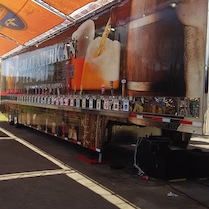
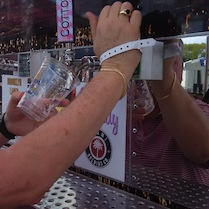
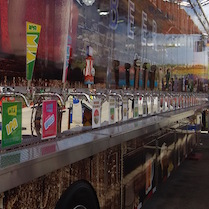
Dave mentioned the iPourIt Technology he encountered at the Miami-Dade County Fair. Here is a video of it at work:
| The Miami-Dade County Fair | ||
 |
 |
 |
 |
 |
 |
Chris in Miami Beach, Florida listens to the podcast and is calling via the App told us: "I can't believe a troll actually called your show. I wonder if David from Delaware ever had toys as a child. I'm pretty sure you and Mark are in touch with your inner child and probably Chris and Samantha haven't grown out of their childhood yet. Every week I learn something new on the show so thanks a lot and keep up the good work. I really enjoyed the interview with Mark Walters from the Z-Wave Alliance. I wonder if he could give me a recommendation on a good Z-Wave controlled sun screen or privacy screen for a big picture window."
Z-Wave Alliance doesn't exactly have sunscreens or privacy screens, what they do certify the controllers that move the parts that will open or close your privacy screens. In fact, we sent your question to Mark Walters and he called in with a response for Chris.
You could look into something like the iMotorShade Z-Wave Certified Tubular Motor, which will spin and move an existing shade or shutter into place.
There are Z-Wave Universal Motor Interfaces that you can buy for around $160, sometimes you will find cheaper ones, but without wireless capabilities, which usually defeats the purpose.
You can also look at SmartGlass options, those are the electrochromic windows that you can frost on demand, Z-Wave also certifies them. That won’t come cheap for a large window, we’ve found 8x11 samples that sold for $300, but it is probably the most impressive and techy solution.
As for trolls calling the show, I think that particular caller was quite sincere, as opposed to the typical troll who knows he or she is being silly to provoke an argument. We didn’t agree with that guy, obviously, and we had a little sport at his expense.
Hey, we gave him his entire unedited phone call and let him slam us up one side and down the other, so we felt justified in taking a few return shots ourselves. What was truly puzzling, though, is why someone who was so decidedly anti-consumer electronics would listen to this show in the first place?
That’s a little like the pacifist who watches MMA matches, or the vegan who works in the butcher shop. It doesn’t make sense. But, hey, thanks for your support. It’s callers like you who make what we do worthwhile. Seriously, thanks for listening...and participating in the discussion.
For more information tune in to Hour 1 of our podcast.
Consumer Reports Feature:
Lots of smart-phone customers suspect they could get a better deal by switching carriers — and they're probably right, especially if they're still on an old contract plan. But what if you want keep the phone you have when you switch, rather than upgrade? Consumer Reports' electronics spokesman James McQueen is here with some tips.
The "Into Tomorrow" team discussed the latest apps that they have been playing with recently.
• Mark recommends: Google Calendar, FREE

"This week, my featured app is Google Calendar. I know, I know...have I been living under a rock? No, hear me out. I'm talking about Google Calendar for iOS. Not some mobile web interface, either, but a real living and breathing app for your iPhone or iPad. I'm a dedicated Google Apps user at work, and as you know there have been some issues with events synchronized between Google's calendar in the cloud and the Apple calendar apps, specifically time zones being set incorrectly. Google Calendar for iOS has changed all that for me. I switched off Apple's calendar app and switched to Google Calendar. If you're googled-up like I am, you should give it a try also. It's free in the Apple App Store." -- Mark
• Chris recommends: ShopWell, FREE

"ShopWell helps you eat healthier food and achieve your nutrition goals. Use ShopWell to help manage your weight and conditions like diabetes, high blood pressure, and Celiac disease. ShopWell can also help you maintain a vegan or vegetarian diet. Scan barcodes at home or in the grocery store to find out if they are a good match for your goals. The app will even suggest foods that are a better fit for your health."
What are your favorite Apps? Let us know at 800-899-INTO and we'll feature them in this segment!
Tune in to Hour 1 of our podcast for more details
J in Livonia, Michigan asked us: "Hi, In regards to printers, it used to be that lasers were more efficient because you often had to sit there and clear those that were inkjets. Is that still the case, so that you end up wasting a lot of ink? I don't use my printer that much, and second of all, I am looking for one that will be able to use the old Mac 10.4/10.5-- I am looking for one that does scan, fax, copy and print. Looking for your assistance on that."
The inkjet printers we’ve used recently don’t have to constantly clean their cartridges like the old ones used to, and they tend to still be cheaper than their laser counterparts. Wasted ink and wasted time waiting for them to clear whatever blockage had gotten into their printing heads doesn’t seem to be an issue these days.
Your second question is much harder to answer though, in particular because you want a printer that will play nice with Mac OS 10.4, that’s Tiger, Tiger came out in 2005. To give you an idea of how old that is in computer terms, 2005 was long enough ago, that Steve Jobs may have been carrying a Motorola RAZR V3 back then. Tiger predates the iPhone.
Given that 10.4 isn’t even supported by Apple anymore, and that any computer from Apple’s Intel era could upgrade past 10.4, no manufacturers are advertising compatibility with that OS as a feature, and whatever newer printer you buy may or may not work with your OS.
10.4 was Tiger, after that came Leopard, then Snow Leopard, then Lion, then Mavericks and THEN the current version which is Yosemite, 10.4 is going pretty far back, especially when taking into consideration that lately the upgrades to newer versions have been free or close to free.
You can still find refurbished printers from 10 years ago that claimed compatibility, you may be better off looking at those in particular, otherwise most new printers probably won’t work properly with your computers, you may be able to print, but you probably won’t be able to access the rest of the features.
You can also look for printer/scanner combos without fax support and move to online faxing, that may make it easier to find a printer that still has drivers for your machines, but even that won’t be easy. An HP Deskjet 3050, for example, has support for drivers as far back as 10.5, but if you also need 10.4 support it won’t work for you, and that’s a 2010 printer, 5 years have passed since even that model was released.
For more information tune in to Hour 1 of our podcast.
HOUR 2:
Tech News & Commentary
Scott in Jackson, Mississippi listens on SuperTalk 97.3 FM and is calling via the App asked us: "I have an Android Phone and sometimes the phone will fill up with apps so I start delete apps. But as soon as I delete them, it keeps getting fuller and fuller. What's going on? Eventually I just reset my phone and start over."
Are you sure it’s actually filling up with apps and not something else?
Android will let you see what’s actually using up your storage space under Settings and Storage. It may actually be apps, just like you think, but you may be filling your phone with pictures, songs, or other media.
If it is your apps, they may just be storing data that you don’t know they’re keeping. Developers are technically supposed to keep their storage use in check, and cache files more than store them whenever possible. Meaning that if something will only be used for a short time, or if it will only be used to increase efficiency, it should be deleted when it’s not needed or when storage space is running short.
The problem is that the “don’t hog resources” rule, is mainly a “best practice” more than an actual enforced law, so unless the app is using an extreme amount of storage space, Google tends to give it the benefit of the doubt.
Restoring the phone would take care of that problem, but it’s a little bit like firebombing a village to make room for a fire hydrant, it gets the job done, but the side effects of restoring and having to get all your things back the way you like them is more than a little annoying.
You could go through you list of apps and check the ones you suspect of using too much storage space, Android will let you see the size of their caches, you may be able to get rid of the problem by just uninstalling and reinstalling those apps, or clearing their caches, rather than to have to deal with doing a full clean restore of the phone.
It would be very unusual if apps were taking up most of the memory on your phone, unless your phone happened to have very little memory indeed. We’ve seen a lot of smartphones run out of storage, but 999 times out of 1000, it’s caused by pictures, videos, or music.
For more information tune in to Hour 2 of our podcast.

"This Week in Tech History" Weekly Feature with Chris Graveline
Vicky in Lexington, Kentucky listens on WLRT 1250 asked us: "What is the best young-child educational type toy that you know of? I have a 14 month old granddaughter and I'm looking for something for her to use in the next few years for education."
There are lots and lots of educational young kid laptops and tablets, it’s hard to pick one, but we’ll give you a few to choose from.
For about $50 you can get a Fisher Price iXL 6-in-1 Learning System. It features a touchscreen with a stylus that kids can use, and it’s an ebook reader, mp3 player, photo viewer, art studio, notepad, and gaming system.
It comes with some games built in, but parents can buy new ones featuring Disney characters, SpongeBob, Dora, and other kid favorites.
If you want something that will probably last her a while, you could go with an Amazon Fire HD Kids Edition, it does cost more, around $125, but it comes prepared to survive being used by young children, and it comes with a year’s worth of access to a large library of kid friendly content via Amazon’s FreeTime.
The main advantage the Fire has is that it’s a real tablet, with real access to other content, like the Disney Channel and Nickelodeon.
For something in between those two, the LeapFrog3 features dual cameras, a pretty powerful processor for a tablet for kids, and can do everything the iXL can do and more, on a package that feels like it may hold her interest for a while longer as she grows up. This one would cost you around $100, which puts it a little too close to the price of the Fire for kids, but it is designed for younger children and it may serve her better right now.
If you already have an iPad, you might consider an Osmo. This $79 device consists of a reflector that clips over the camera, a stand for the iPad to hold it vertical, and software. The iPad engages with the children and guides them through learning games using REAL WORLD objects like blocks, or letters, or even drawing on a blank page. The child isn’t tapping and swiping on the tablet, they’re using the kind of spatial and motor skills that educators say are important to develop, and the device is simply patiently guiding them and interacting with them as they learn.
It really is impressive. Time Magazine awarded it Invention of the Year last year, and we can see why. There are videos of it in action on their website.
For more information tune in to Hour 2 of our podcast.
Victor asked us: "I have a hard time hearing my cellphone ring when my phone is in one part of the house and I'm in another. Is there something I could buy or use to make the ringers louder so I could hear it? I have a slight hearing problem."
There are some ringer amplifiers designed for the hard of hearing, but be careful with them. If you don’t have hearing problems now you might after using them…
The is a cradle that detects the phone going off and plays a very loud audible alert, it can be set to ring at up to 100db, which is about the equivalent of Eisenhower’s old Bell 47J Presidential Helicopter hovering 100 feet over your head. It also looks old enough for Eisenhower to have used it with his phones.
Ironically enough, a company named “Serene Innovations” also makes some very non-serene loud ringers that feature a bright strobing light as well, since they’re also geared towards the hearing impaired, including the fully deaf, not just the hard of hearing. All of their models are somewhere around $100.
A much less ironically named company called “CentralAlert” sells a device that does the same thing and looks very similar, and unfortunately costs about the same too.
If you have a smaller budget, what you can do to ensure you hear your phone is to connect your phone to an auxiliary cable and connect the cable to a stereo or speaker and put the volume all the way high. Auxiliary cables can range from $5 to $15.
While it’s not exactly a ringer, you could look into a bluetooth enabled home phone,some of them can pair with a cellphone and have multiple handsets. That means that you could leave a handset in one room, another one in another room and have 2 ringers, plus the cell phone’s own, and you could pick up any of the handsets to answer calls.
It’s not a solution that will make your cellphone louder, and it does require remembering to leave your cellphone by the bluetooth enabled home phone, but you would get extra ringer and you wouldn’t have to run across the house to pick up.
For more information tune in to Hour 2 of our podcast.
Michael in St. Joseph, Michigan listens on WSJM 94.9 asked us: "I have an Asus netbook, X205T. Got it on Black Friday, then suddenly the screen stopped working. The unit powers up, but nothing comes up on the screen. Not sure if it's a known issue with netbooks and maybe you can offer in idea how to resolve it."
Netbooks are less powerful and therefore less expensive laptops, but they shouldn’t be any more prone to screen failures than other laptops.
If you bought it in November, it has to still be under some sort of warranty, it’s not even six months old. Call either ASUS or the store you bought it from and tell them that the screen died.
To be honest, if it can’t be replaced under warranty, it’s probably a total loss… an entire ASUS X205T can be bought for under $190, back when you bought it, Staples had it on sale for $99, replacing the screen itself won’t be much cheaper than that.
Again though, there’s no way this computer won’t be under some kind of warranty and ASUS is typically a reliable brand, you shouldn’t have much trouble getting it fixed or replaced, and if it boots up, the drive and your information are probably safe too, so you shouldn’t lose anything but some time.
For more information tune in to Hour 2 of our podcast.
Larry asked us: "Whenever I open my laptop to log on there is a big message saying 'please authenticate using your bluetooth security tag' How do I get rid of this? I am running Windows 8.1 on a laptop."
It sounds like you have some program installed that can allow you to log into your windows account using a bluetooth device.
There are a few that can do this, a company named Rohos makes one, there’s another one called Bluetooth Passport Pro, but unfortunately we have no way of knowing which one may be asking you to use your bluetooth device to log in.
Have you installed any security software lately? If you have, that may be the cause. Since this is something that seems to run on it’s own, you can try to disable it by going to run and typing “msconfig” and trying to figure out which service from the list it could be, but that will probably require a bit of trial and error.
Some Toshiba laptops a few years ago came with this feature built in, and it became active even before Windows was loaded, using a bluetooth device to give you access to the BIOS settings, for example. Your computer may have come with the feature built in and you or some software may have activated it without you noticing. As far as we know, though, this is not a standard feature that comes with every copy of Windows, and if it came on on it’s own, it’s probably the result of installing something recently.
If this is a corporate laptop issued by your workplace, you should check with the IT department there. These kinds of security measures are often put in place by those groups and are switched on for computers that will be accessing sensitive information. Perhaps yours was switched on by mistake?
If this is a personal laptop that you bought from the local computer retailer, you might also take it back to them and ask what is causing this. Because, as we’ve already said, this is NOT part of the base Windows installation. Someone has added this security layer to your laptop. It’s not something you should have to live with, if you don’t need it. (And especially if you don’t have this Bluetooth Security Tag.)
For more information tune in to Hour 2 of our podcast.
Red in Delaware listens on WDEL 1150 asked us: "How come no one makes a tablet that can also be used as a regular phone?"
One of the main reason why tablets haven't come out with the phone capability feature is basically to keep costs down and many cellphone carriers want to sell phones AND tablets, and if they combine both together, they are concerned it will affect sales.
However, there are some tablets that do carry this feature such as the Samsung Galaxy Tab or Dell Streak 7 but they're not designed primarily for phone use.
Or … some have said there is a size limit on what can be considered an actual phone versus a tablet. Dell Streak 7 has Sim Card capabilities but is currently only available in Canada. There are apps you can use that require Wi-Fi, mobile data or possibly both such as TextPlus, ooVoo, fring, and Skype being the most popular of the calling apps. These apps are available on Andriod and Apple devices.
There may even be a simpler answer. Not enough people want them. It’s expensive to design and build a consumer electronics device. It only makes sense to do it if you believe that you’re going to sell a bunch of them. And while we get a question like yours every once in a while, we’re confident that the number of people out there who want to spend money on a tablet that is also a phone isn’t large enough to justify making one. How do we know? Well...because no one makes such a device. And they WOULD, if they thought they could sell it.
For more information tune in to Hour 2 of our podcast.
HOUR 3:
Tech News & Commentary
Marty in Winchester, Tennessee listens on WTN 99.7 asked: "I was looking for an app for an Android for an anti-virus scan to help my phone if there's a virus on it."
Unless it’s rooted, you probably don’t need any kind of antivirus for your Android device, they don’t work the same way computers do and can’t just infect other files or apps outside of their small domains.
Having said that, just about everyone from AVG, to Avast, to Bitdefender, to Kaspersky, to MalwareBytes, to really just about everyone else.
Some like Avast offer special tools for users with rooted devices, to try to limit the risk of having apps that can suddenly escape their sandboxes, others basically run a scan of what’s installed and give generic advice as to what apps can be a “privacy risk” by storing cookies or uploading usage information.
Just keep in mind before you worry too much about an antivirus that Google scans every app before they’re uploaded to the Play store, the only problem used to be sideloaded apps that you download from other sources and copy onto the phone yourself, however, since Android 4.2, those are ALSO scanned when you add them to your phone.
If for whatever reason an app evaded Google’s scans and they find out later that it was malicious, they can (and have in the past) remotely uninstall it from your device.
Antiviruses on non-rooted phones are basically placebos to make you feel safer. They do a few semi-useful thing, like letting you know if a website seems fishy, but they’re not very useful. If your phone is rooted, then focus mainly on antivirus apps that specifically offer features for rooted phones.
For more information, tune in to Hour 3 of our podcast.

"Into Gaming Update" Weekly Feature with Mark Lautenschlager
Travis in Haughton, Louisiana listens on 710 KEEL asked: "I was listening and they were talking about an FM radio chip that was in our cell phone devices that was disabled. How do I enable that or is it possible?"
The answer was that it’s not possible to enable this chip, Travis. The chips that are used in smartphones are very similar to the chips used in any kind of portable radio receiver, and as such they have capabilities to meet a wide range of applications.
Unless a smartphone was specifically designed to connect the chip inside with the supporting hardware needed to turn it into an FM radio receiver, there’s nothing you can do to cause that to happen.
But, as we noted the last time we talked about this, it’s the rare broadcast radio station these days that doesn’t already have a streaming audio feed over the Internet. Also, apps like TuneIn Radio give you access to hundreds of radio stations from all over the country.
For more information, tune in to Hour 3 of our podcast.

"IFA History Feature" brought to you by Messe-Berlin
The breakthrough for magnetic recording came in 1933 with the invention of the first recorder named "Magnetophon" by the German Eduard Schueller. One year later the chemical company BASF finished the development of the necessary magnetic tape, coating an acrylic tape with iron. In 1935 Schueller's lab model together with the tape by BASF became reality at the Big German Funkausstellung with the "Magnetophon K1" by AEG. The first tape recorder in the world was a sensation at this show which today, is named IFA.
Steven in Fairbanks, Alaska listens on KFBX and is calling via the App asked: "I'm wondering what you guys would recommend for a cell phone signal booster. We live off the grid, so it would have to be something of lower wattage."
In terms of signal boosters-- going online to find one may be your best bet because they tend to be more affordable, and getting a high-quality one is probably really important in your case because you are living off the grid. Wilson Electronics offers a few signal boosters that run a bit high in price, but may be totally worth your time.
The Wilson Electronics DT 4G for a small home or office is actually listed as a best-selling item on Amazon. It will work with all major cell-phone carriers and comes with an instructional video for smooth and easy setup. Installation can be tricky, and requires users to be meticulous with placement of an inside and outside antenna-- but with a 30-day money back guarantee PLUS with that instructional video ... how can you go wrong? This signal booster runs about $330 on Amazon.
If you are looking for something a bit less pricey, zBoost also offers a few signal boosters-- two of which are among the top five best-sellers on Amazon. The zBoost ZB545 SOHO signal booster is listed as the #1 best selling signal booster on the entire site and comes in at various prices depending on the square footage of your home.
For example, at 750 square feet, it will only cost $204 and at 10,000 square feet it will cost $330-- the same price as the Wilson Electronics one specialized for small homes and offices.
We’re not sure what carrier is providing your service, but you also might want to consider heading over to their nearest store OR website and checking out what signal boosters THEY have.
The last thing you’d want is to purchase a signal booster that doesn’t work for your phone, so be safe and check out specifics on all these products before jumping the gun.
And as for “living off the grid,” we’re not sure what that means regarding your power source. If you mean that you run on solar or wind power with batteries for storage, then you’ll be pleased to know that these kinds of devices don’t draw an enormous amount of power. Like any electronics, it’s modest. Running a toaster for a few minutes is probably the same as a full day of the signal booster.
For more information, tune in to Hour 3 of our podcast.
If you have any questions about any of this week's show info, please email us here.
This Week’s Prizes for Our Listeners
Burg: Burg 16A Smartwatch - connects with iOS and Android phones, offering handsfree calling, text and e-mail notifications and more!
Education.Com: Several "Brainzy" 12-month codes for online early-learning programs for math and reading. If you’ve got Kids ... you WANT one of these!
HD Radio: "Into Tomorrow" branded Portable AM/FM/HD Radios - these are in high demand and give you more FREE radio -- the way it should be!
LG: An LG ‘G’ Vista Smartphone with an extra large display and good battery life.
NanoTech: Several UltraFlix Gift Cards for 4K Content, like movies and a ton of other cool stuff. Let us know if you have a 4K Ultra HD TV!
NovaPhotos: A couple of their cool Bluetooth off-camera FLASH units for iPhone (that we featured in a recent ITTV piece). Perfect for Selfies. They have 40 LEDs!
Download Our Show
Audio Archives
Download the audio archive for this show.
The commercial-free version of this show has been edited & archived for at least 6 months for your listening pleasure! Simply click on the MP3 link below. If you’d like to save it on your computer, right-click on the link.
Hour 1 MP3
Hour 2 MP3
Hour 3 MP3
Listen To Our Show
Full 3-hour Show
To listen to our show click on the RED "Play" button below.
Hour 1:
Hour 2:
Hour 3:
Amazon Links »