<< Last Week's Show (03-27-15) | Next Week's Show (04-10-15) >>
Weekend of April 3rd, 2015
Don't forget our Ask Dave Hotline is open 24/7! Call us ... toll-free 1-800-899-INTO (4686) ... with any consumer electronics question, opinion, help another listener or tell us what your favorite app is and why. You can also participate via our FREE "Into Tomorrow" App (iOS/Android/Intel AppUp).
ITTV Video Update
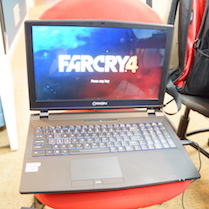
This week, on ITTV, Dave chats with Kevin Wasielewski from ORIGIN PC about their line of high-performance gaming computers and peripherals- from home media PCs, to laptops to high-end customizable desktops as well as a pretty cool backlit keyboard. Also, Chris takes a look back at some of the tech milestones of yesterday, with "This Week in Tech History", including the formation of a true tech giant.
Listeners & Guests on the show this week:
For ALL the details ... be sure to listen to the show by downloading the MP3 or clicking the RED & WHITE "Play" button on the media player, both on the right-hand side of this page.
HOUR 1:
Tech News & Commentary
Terrance in Anchorage, Alaska listens on KFQD 700 AM told us: "I would really love to find a phone that is not made in China with a battery that is not made in China, that uses something other than Windows, Apple OS, or Android. Is there any such phone? I found a phone that was only available in Europe that uses Ubuntu. I was wondering, why isn't it available here?"
The real answers as to why the Ubuntu phone is not available here, is because there’s virtually no interest in the phone anywhere! Even in Europe they barely sell, and that’s a fully unlocked phone for under $200.
The truth is that the phone’s specs were underwhelming even when it was announced a few years ago, and they’re even worse now, and the OS itself may be great, but users are basically sentencing themselves to owning a fancier feature phone, since no one but themselves is going to bother adapting their apps to yet another uninteresting platform.
Now, as for phones not made in China and not running iOS, Android or Windows… the toughest part will be the OS, there are some phones that are still not always made in China.
The problem is that as far as manufacturers are concerned phones are made where they’re made and no one cares, so you may get a Brazilian iPhone (we’ve heard of Foxcomm factories setting up there), or a Korean Samsung Note 4 (they have factories actually set up in the DMZ!), but for the most part you get what you get and volume and odds alone make it far more likely for your phone to come out of China.
If you’re really set on getting a phone that won’t come from China and won’t use any mainstream OS though, your options are basically this: a few, but no all Blackberries, and even Blackberry has largely moved all manufacturing out of Canada, and getting a non-chinese battery is gonna be next to impossible.
We live in a globalized world, you may have to surrender and accept that we have largely chosen to use a workforce in China that is treated very nearly as slaves, rather than to put up with higher prices for our products.
For more information tune in to Hour 1 of our podcast.
Consumer Reports Feature:
Dust, coffee drips, and other debris on computer keyboards and monitors, tablets, phones, and TVs make them look disgusting — and can affect how they work. But cleaning your electronics the wrong way can do more harm than good, so says Consumer Reports. The magazine's electronics spokesman James McQueen is here with some tips on how to properly clean your gadgets.
The "Into Tomorrow" team discussed the latest apps that they have been playing with recently.
• Mark recommends: Periscope, FREE

"Periscope, the new live streaming video app from Twitter. Actually, Twitter bought the company developing Periscope for $100 million dollars almost a year ago, but now the app has officially launched and I have to say it's pretty cool. Essentially Periscope lets you turn your smartphone (iPhone only at this point, Android users will have to wait) into a live video broadcasting tool. It's quite addicting. You just open Periscope and it shows you video streams to watch that are live right now. Click on a stream and you virtually drop in to another person's life, somewhere in the world. Video and audio quality are very good and people watching the stream can chat with each other and the streamer. If any of the people you follow on Twitter start up a stream on Periscope, you're notified by your phone that they've gone live. Video streaming is nothing new. Video streaming with a smartphone is also nothing new. But having a service as ubiquitous as Twitter being both the distribution point and the table of contents is a real game changer. It's possible that Periscope will be a fad, but it's so well executed and so compelling that I really think it's going to change the world in the same way that Twitter did." -- Mark
What are your favorite Apps? Let us know at 800-899-INTO and we'll feature them in this segment!
Tune in to Hour 1 of our podcast for more details
Brandon in State College, Pennsylvania listens on WRSC 103.1 FM and called in to help another listener: "I have one of those Asus laptops, the screen will come disabled at times. When I first got mine, i did some research. You have to hit the function key to re-enable the screen. Don't know if that will help. I know I thought my Asus was broken, but it wasn't. Just wanted to throw that out there."
What Brandon is talking about is the function key combination to switch to an external display. On an ASUS laptop that is done by pressing the Fn key and the F8 key at the same time.
Windows will generally autodetect when an external display is, or is not, connected and do the right thing without needing to be told. However, it is indeed possible that a laptop could become stuck on an external display and cause its internal screen to be disabled.
So, as Brandon suggests, before you decide that your laptop screen is broken, you should (if you have an ASUS) try Fn+F8 to switch off the external monitor support. Other laptop brands will use a different combination. Dell, for instance, uses Fn+F4. So be sure and check your owner’s manual if you can’t figure out the pictures on your keyboard.
Thank you, Brandon!
For more information tune in to Hour 1 of our podcast.
Patti asked: "My Mother just told me about your site and thought you may be able to help us. My Brother passed away several months ago and he had a laptop computer that requires fingerprint Bio Id. We don't have his fingerprints and there is no documentation of passwords to gain access either. We don't know of anyone that is trustworthy and knowledgeable enough to work on the computer. What do I need to do in order to gain access and not lose any of his files. My Mother has been in severe depression and treasures every interest he had. I would love to be able to open my Brother's computer and let her see what was important enough for him to save on the computer. Of course I would make adjustments so there wasn't anything that a Mother shouldn't see. If you can help us or direct us to someone trustworthy and knowledgeable we would appreciate it immensely."
First of all, please accept our condolences on the loss of your brother. The good news for you is that Windows passwords are not typically that hard to get around.
There’s a tool called Offline Password Editor that will do what you need. Basically, you’d need to ask a techie friend to boot into it from a USB drive. From there, it’s possible to get a list of users and overwrite a password with whatever other one you’d like to have instead. After that you should just be able to run Windows and log in with the new password.
The process is a little technical, here's a page that explains how to do it, just come by this week’s show notes. It is also possible to just access the contents of the drive from a free live Linux distribution running from a USB drive or a DVD, but it may be an awkward interface for you if you’re used to Windows, and you may not be able to open every file from there easily.
Replacing the Windows password would also allow you to start the computer and run it any time without having to launch live Linux USB every time, and to see things the way he was seeing them if that’s important for your mom (for example, his wallpaper).
For more information tune in to Hour 1 of our podcast.
HOUR 2:
Tech News & Commentary
Joshua in Sparta, Tennessee listens on WTN 99.7 and is calling via the App asked us: "I wanted to ask Chris if he can give me a link to the app he was talking about that helped you in the grocery store. Also, I wanted to know if you guys had an app or a suggestion on how to get the maps in cars that would actually give a good download for streets and that sort of things. I noticed that in my wifes car, a bunch of roads are considered not viable, where they're in my Garmin and my Garmin is not technically as updated as her vehicle is supposed to be."
Chris recommended the app ShopWell.
As far as GPS goes, as long as she always has data service, just about any of the popular online maps will do, Google and Bing both offer mapping and directions for smartphones, as does MapQuest. If connectivity is an issue, the big brands like TomTom and Garmin offer offline maps as well.
If she has navigation built into her car, those maps won’t replace what she sees on the screen, but there may be updates for those maps as well, to find those you may need to check online or with a dealership. Sometimes updates are free, sometimes they’re free for a while, sometimes they just cost you money. Whether or not that’s a worthy investment is up to you, but if you don’t want to spend the money, you can probably find reasonable free and paid replacements right on your smartphone.
It’s also worth noting that many of the aftermarket in-car navigation and entertainment systems will either use Google Maps live, or offer a direct link to the apps on your smartphone so you can get Google Maps in that way.
Most of the time, the in-car systems that are sold with the vehicles are not the latest and greatest technology. Car makers are concerned with costs, and the cost of installing a different sized unit, for example, is multiplied by millions of dollars to change the size of the opening in the dashboard. And that’s only ONE reason why they might choose one unit over another.
So if your wife’s car is using the original navigation system that came with it, as we suggested you can contact the dealership and ask about an update, or you can Google for an online owner’s forum and ask there. But the best bet might be looking for a replacement aftermarket unit that has a much better connection with a mapping service, like Google Maps, that is constantly updated.
For more information tune in to Hour 2 of our podcast.

"This Week in Tech History" Weekly Feature with Chris Graveline
Trey in La Vergne, Tennessee listens on WTN 99.7FM asked us: "About the cars made by Ford that obey the speed limit. Wouldn't that make the police officers mad that are out there trying to meet their quotas for the month? Most police officers have to give out a certain number of tickets a month. Also - if a cop pulls you over and says you're speeding, would you be able to argue the fact that your car is unable to speed and say that he's lying?"
Police officers will tell you that they don’t have ticket quotas to reach. Officially, that’s true. We’ve never heard of a department where there was an actual ticket quota as an official policy.
On the other hand, we are well aware of departments that have told officers who do not write enough tickets that they must not be doing their jobs well enough. The assumption being that traffic violations are out there and if you can’t find them, you’re not trying. There might be some truth to that, but it still smells like quota to us.
I personally witnessed the following, one weekend. There is a two lane road leading into a state park here in Fort Lauderdale. A police vehicle had pulled over a car and had its lights on. In Florida, there is something called the “Move Over” law that says you have to move over one lane away from an emergency vehicle with its lights on, if you are able. If you cannot move over, you must slow down to a speed 20 MPH under the posted speed limit. This was a two lane road, so you couldn’t move over. It was a 25 MPH limit so you would have to slow down to 5 MPH. The entire thing was a setup, both cars were cops, and if you went past them at more than 5 MPH, they waved you over and ticketed you. This is absolutely a true story.
Regarding your second question, many cars have speed governors today, and these Ford cars are only different in that they can set the governor’s top speed automatically and nothing else, the speed restrictions can be turned on and off.
As for telling a cop that your car can’t go fast enough to be speeding, if they have a properly calibrated speed gun that says otherwise, they’re gonna believe their tech over yours.
You can argue that invisible aliens from Neptune drive in front of you and won’t let you speed, but they don’t have to believe you when they have evidence to the contrary.
For more information tune in to Hour 2 of our podcast.

 |
 |
 |
| Laptop with desktop components | Ready for the interview | Keyboard with customizable backlight |
Kevin in Garner, North Carolina listening on WPTF 680 AM asked us: "I was calling to find out which anti-virus you use or would recommend for a laptop running Windows 7?"
We use a paid antivirus here, so if you’d rather not pay, there are a lot of reputable free antivirus programs that would probably serve you well, for example Malware Bytes and Panda Free have been rated as the editors choices by PC Mag and you can have either of them for free.
If you think your computer is getting a little old and would like to have something lightweight, Microsoft Security Essentials is known for being very good about not slowing down the operating system and it regularly scores high on reliability and threat detection. Now, if you’re willing to pay, our antivirus of choice for a few years has been Vipre, it’s currently on sale for $50, but it will normally cost you $80.
Webroot and BitDefender have been scoring high on antivirus tests lately too and they will cost you $20 and $40 respectively.
And while we don’t want to discourage you from running a resident program to protect against viruses and malware, we do want to make everyone aware of an interesting alternative. It’s called Virus Total and it’s a website at virustotal.com.
What makes it unique is that it allows users to upload a file they want tested and it runs it against ALL of the popular antivirus engines. In most cases, when you’ve downloaded some plugin that some website says you have to have, you’re probably inviting something bad into your computer.
A few minutes spent uploading that file back to Virus Total might save you hours of disinfecting and repairing. In our testing, with so many engines checking the file, nothing has been able to slip past. If they ALL say it’s good...then it’s good.
For more information tune in to Hour 2 of our podcast.
HOUR 3:
Tech News & Commentary
Spud in California listens on KTIP 1450 AM asked: "I'm Interested in a large screen camera/phone arrangement"
Do you mean cameraphone with a large screen? Cause pretty much any modern phone will take very nice pictures. You can probably just settle for the phablet of your choice, be it the Galaxy Note 4, the iPhone 6+, or any of the many, many other ones and they will all function as a great point and shoot camera.
A lot of phablets even have pretty high megapixel counts if you want to take big pictures, the Note 4 has a 16MP camera for example, the LG G3 has a 13MP camera, those should give you plenty of pictures for large prints.
You could also look at a smart camera, which would pretty much have to be on of the cameras on the Samsung Smart Camera line up. Those are fully featured, large zoom cameras that run on Android and can do just about everything a smartphone can.
For more information, tune in to Hour 3 of our podcast.

"Into Gaming Update" Weekly Feature with Mark Lautenschlager
Guest Segment:
Dr. Jose Romano, Chief of Stroke Division & Professor of Clinical Neurology at the University of Miami Miller School of Medicine & serves on the Scientific Advisory Board for NovaVision

"IFA History Feature" brought to you by Messe-Berlin
The first professional studio tape recorder came to the market in the US in 1948 with the Ampex 200; two years later in Germany, Grundig and AEG began producing the first tape recorders for home use. At the Funkausstellung in 1953, Grundig showed an open reel tape recorder with six inch reels and reverse operation. Ten years later the end had come for the complicated open reel recorders as the Compact Cassette offered easy operation with a tiny cassette housing the tape. Both technologies were introduced at IFA.
Albert in Three Rivers, California listens on KTIP 1450 AM asked: "What program is the best for to transfer my settings in the different programs I have on an old Windows XP Media to a new Windows 8.1?"
Microsoft built a tool into Windows called Windows Easy Transfer for just this very purpose, and you MAY be able to use it… then again, you may not…
Windows Easy Transfer is supposed to grab your files and your settings from an old computer and move them automatically to a new computer, you just run the software on both computers, choose a method of transfer from the options given to you (for example, a network cable).
It should be easy, unfortunately it may not be. Windows Easy Transfer cannot transfer files from a 64-bit to a 32-bit operating system, most Windows 8.1 computer are 64-bit, but not all of them are, so if you happen to have bought a very cheap Windows 8.1 computer you may be out of luck and you may have to transfer everything manually.
There’s another problem, though, and it got Microsoft enough bad press that they had to find a solution. Even if you can use Windows Easy Transfer, on XP they will only move files, but not settings or programs, which was unacceptable to a lot of users.
Microsoft ended up cutting a deal with a company called Laplink, and is currently offering their tool called PCmover Express for free on WindowsXP.com to make it easier for people like you to move all of your files and settings. That’s the tool you probably want to try first, it will be free, and it will move everything you want to move, not just your files.
However, let’s be straight here. Using a migration tool like this one only makes sense if you’re planning to use the same apps, and really the same version of those apps, and not simply moving the data. How likely is that to be the case?
Your Windows XP machine is guaranteed to be old, perhaps even very old. The Windows 8.1 machine is running a newer version of Windows, and we’d think you’d want to put the newest versions of your apps on it (and possibly replace some apps that no longer exist).
Certainly moving your documents, pictures, music, and videos makes sense. And data in apps like Quicken makes sense also. But migrating the apps themselves, all their settings, and all their data doesn’t really make sense when the gap between machines grows too large. Keep that in mind, when you’re deciding what to do.
For more information, tune in to Hour 3 of our podcast.
If you have any questions about any of this week's show info, please email us here.
This Week’s Prizes for Our Listeners
Burg: Burg 16A Smartwatch - connects with iOS and Android phones, offering handsfree calling, text and e-mail notifications and more!
Education.Com: Several "Brainzy" 12-month codes for online early-learning programs for math and reading. If you’ve got Kids ... you WANT one of these!
HD Radio: "Into Tomorrow" branded Portable AM/FM/HD Radios - these are in high demand and give you more FREE radio -- the way it should be!
LG: An LG ‘G’ Vista Smartphone with an extra large display and good battery life.
NanoTech: Several UltraFlix Gift Cards for 4K Content, like movies and a ton of other cool stuff. Let us know if you have a 4K Ultra HD TV!
NovaPhotos: A couple of their cool Bluetooth off-camera FLASH units for iPhone (that we featured in a recent ITTV piece). Perfect for Selfies. They have 40 LEDs!
Download Our Show
Audio Archives
Download the audio archive for this show.
The commercial-free version of this show has been edited & archived for at least 6 months for your listening pleasure! Simply click on the MP3 link below. If you’d like to save it on your computer, right-click on the link.
Hour 1 MP3
Hour 2 MP3
Hour 3 MP3
Listen To Our Show
Full 3-hour Show
To listen to our show click on the RED "Play" button below.
Hour 1:
Hour 2:
Hour 3:
Amazon Links »